An opinionated Terraform module to provision a high availability K3s cluster with external database on the DigitalOcean cloud platform. Perfect for development or testing.

- High Availability K3s Cluster provisioned on the DigitalOcean platform
- Managed PostgreSQL/MySQL database provisioned. Serves as the datastore for the cluster's state (configurable options: size & node count)
- Dedicated VPC provisioned for cluster use (IP Range:
10.10.10.0/24) - Number of provisioned Servers (Masters) and Agents (Workers) is configurable
- Cluster API/Server(s) are behind a provisioned load balancer for high availability
- All resources assigned to a dedicated DigitalOcean project (expect Load Balancers provisioned by app deployments)
- Flannel backend is configurable. Choose from
vxlan(default),ipsecorwireguard - DigitalOcean's CCM (Cloud Controller Manager) and CSI (Container Storage Interface) plugins are pre-installed. Enables the cluster to leverage DigitalOcean's load balancer and volume resources
- Option to make Servers (Masters) schedulable. Default is
falsei.e.CriticalAddonsOnly=true:NoExecute - Cluster database engine is configurable. Choose between PostgreSQL (v11, default) or MySQL (v8)
- Deploy System Upgrade Controller to manage automated upgrades of the cluster [default:
false] - Deploy the Kubernetes Dashboard [default:
false] - Deploy Jetstack's cert-manager [default:
false] - Firewalled Nodes & Database
- Deploy an ingress controller from Kong (Postgres or DB-less mode), Nginx or Traefik v2 [default:
none] - Generate custom
kubeconfigfile (optional)
- Requires Terraform 0.15 or higher.
- A DigitalOcean account and personal access token for accessing the DigitalOcean API - Use this referral link for $100 free credit
Deploy a HA K3s Cluster on DigitalOcean in 10 minutes using Terraform
A default deployment of this module provisions an architecture similar to that illustrated below (minus the external traffic Load Balancer). 2x Servers, 1x Agent and a load balancer in front of the servers providing a fixed registration address for the Kubernetes API. Additional Servers or Agents can be provisioned via the server_count and agent_count variables respectively.
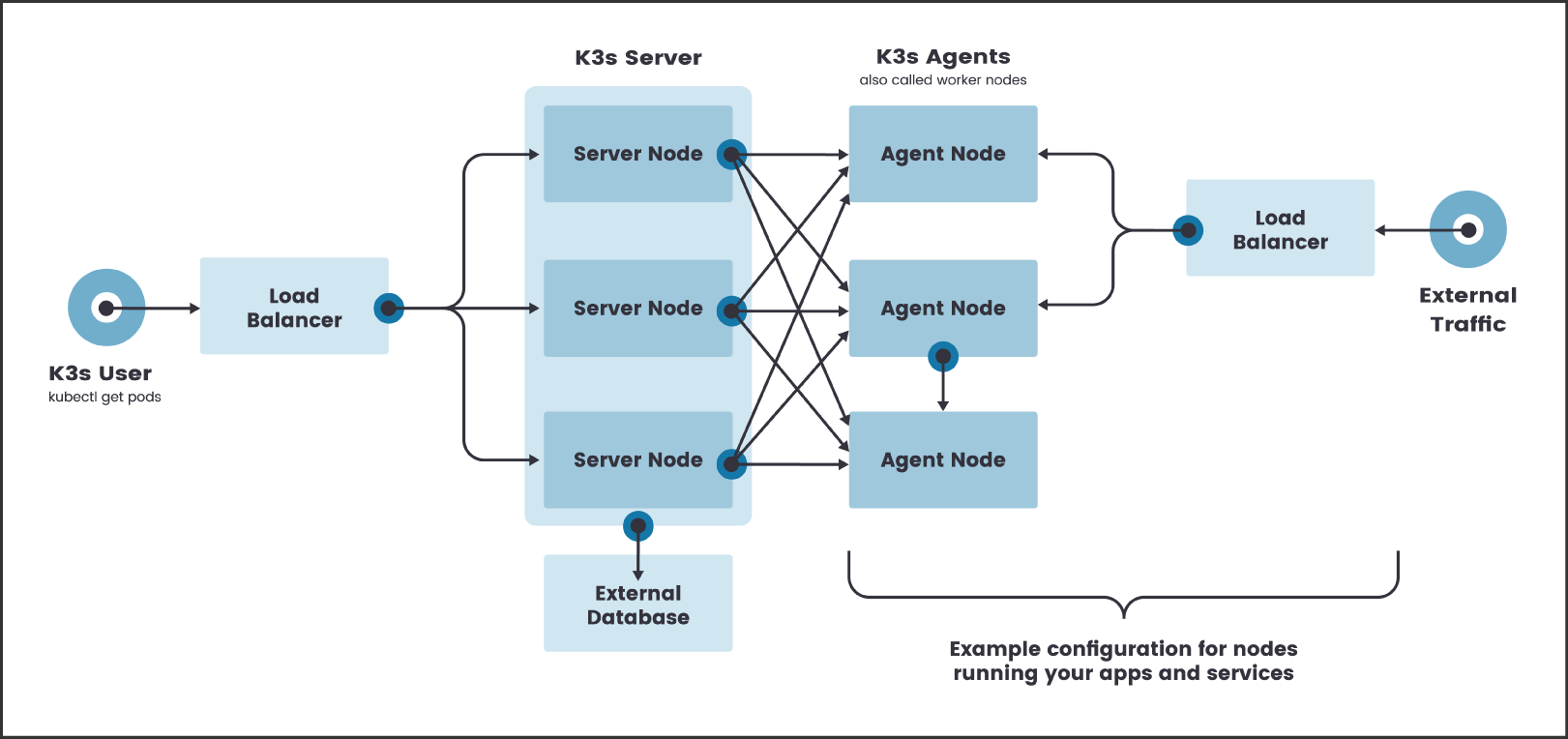
K3s Architecture with a High-availability Servers - Source
Basic usage of this module is as follows:
module "do-ha-k3s" {
  source = "github.com/aigisuk/terraform-digitalocean-ha-k3s"

  do_token                  = "7f5ef8eb151e3c81cd893c6...."
  ssh_key_fingerprints      = ["00:11:22:33:44:55:66:77:88:99:aa:bb:cc:dd:ee:ff"]
}
Example output:
cluster_summary = {
  "agents" = [
    {
      "id" = "246685594"
      "ip_private" = "10.10.10.4"
      "ip_public" = "203.0.113.10"
      "name" = "k3s-agent-fra1-1a9f-1"
      "price" = 10
    },
  ]
  "api_server_ip" = "198.51.100.10"
  "cluster_region" = "fra1"
  "servers" = [
    {
      "id" = "246685751"
      "ip_private" = "10.10.10.5"
      "ip_public" = "203.0.113.11"
      "name" = "k3s-server-fra1-55b4-1"
      "price" = 10
    },
    {
      "id" = "246685808"
      "ip_private" = "10.10.10.6"
      "ip_public" = "203.0.113.12"
      "name" = "k3s-server-fra1-d6e7-2"
      "price" = 10
    },
  ]
}
To manage K3s from outside the cluster, SSH into any Server node and copy the contents of /etc/rancher/k3s/k3s.yaml to ~/.kube/config on an external machine with kubectl installed.
sudo scp -i .ssh/your_private_key root@203.0.113.11:/etc/rancher/k3s/k3s.yaml ~/.kube/config
Then replace 127.0.0.1 with the API Load Balancer IP address of your K3s Cluster (value for the api_server_ip key from the Terraform cluster_summary output).
sudo sed -i -e "s/127.0.0.1/198.51.100.10/g" ~/.kube/config
Functional examples are included in the examples directory.
| Name | Description | Type | Default | Required |
|---|---|---|---|---|
| do_token | DigitalOcean Personal Access Token | string | N/A | yes |
| ssh_key_fingerprints | List of SSH Key fingerprints | list(string) | N/A | yes |
| region | Region in which to deploy cluster | string | fra1 |
no |
| vpc_network_range | Range of IP addresses for the VPC in CIDR notation | string | 10.10.10.0/24 |
no |
| k3s_channel | K3s release channel. stable, latest, testing or a specific channel or version e.g. v1.22, v1.19.8+k3s1 |
string | "stable" |
no |
| database_user | Database username | string | "k3s_default_user" |
no |
| database_engine | Database engine. postgres (v13) or mysql (v8) |
string | "postgres" |
no |
| database_size | Database Droplet size associated with the cluster e.g. db-s-1vcpu-1gb |
string | "db-s-1vcpu-1gb" |
no |
| database_node_count | Number of nodes that comprise the database cluster | number | 1 |
no |
| flannel_backend | Flannel Backend Type. Valid options include vxlan, ipsec or wireguard-native |
string | vxlan |
no |
| server_size | Server droplet size. e.g. s-1vcpu-2gb |
string | s-1vcpu-2gb |
no |
| agent_size | Agent droplet size. e.g. s-1vcpu-2gb |
string | s-1vcpu-2gb |
no |
| server_count | Number of server (master) nodes to provision | number | 2 |
no |
| agent_count | Number of agent (worker) nodes to provision | number | 1 |
no |
| server_taint_criticalonly | Allow only critical addons to be scheduled on server nodes? (thus preventing workloads from being launched on them) | bool | true |
no |
| sys_upgrade_ctrl | Deploy the System Upgrade Controller | bool | false |
no |
| ingress | Deploy an ingress controller. none, traefik, kong, kong_pg |
string | "none" |
no |
| k8s_dashboard | Deploy Kubernetes Dashboard | bool | false |
no |
| k8s_dashboard_version | Kubernetes Dashboard version | string | 2.7.0 |
no |
| cert_manager | Deploy cert-manager | bool | false |
no |
| cert_manager_version | cert-manager version | string | 1.11.0 |
no |
| traefik_version | traefik version | string | 2.9.7 |
no |
| Name | Description |
|---|---|
| cluster_summary | A summary of the cluster's provisioned resources. |
The Kubernetes Dashboard can be deployed by setting the k8s_dashboard input variable to true.
This auto-creates a Service Account named admin-user with admin privileges granted. The following kubectl command outputs the Bearer Token for the admin-user:
kubectl -n kubernetes-dashboard describe secret admin-user-token | awk '$1=="token:"{print $2}'
Output:
eyJhbGciOiJSUzI1NiI....JmL-nP-x1SPjOCNfZkg
Use kubectl port-forward to forward a local port to the dashboard:
kubectl port-forward -n kubernetes-dashboard service/kubernetes-dashboard 8080:443
To access the Kubernetes Dashboard go to:
https://localhost:8080
Select the Token option, enter the admin-user Bearer Token obtained earlier and click Sign in:

Traefik Proxy ingress can be deployed by setting the ingress input variable to traefik. The Traefik dashboard is enabled by default.
Use kubectl port-forward to forward a local port to the dashboard:
kubectl port-forward -n traefik $(kubectl get pods -n traefik --selector=app=traefik --output=name) 9000:9000
To access the Traefik Dashboard go:
http://localhost:9000/dashboard/
Don't forget the trailing slash
A default deployment of this module provisions the following resources:
| Quantity | Resource | Description | Price/mo ($USD)* | Total/mo ($USD) | Total/hr ($USD) |
|---|---|---|---|---|---|
| 2x | Server (Master) Node | 1 VPCU, 2GB RAM, 2TB Transfer | 10 | 20 | 0.030 |
| 1x | Agent (Worker) Node | 1 VPCU, 2GB RAM, 2TB Transfer | 10 | 10 | 0.015 |
| 1x | Load Balancer | Small | 10 | 10 | 0.01488 |
| 1x | Postgres DB Cluster | Single Basic Node | 15 | 15 | 0.022 |
| Total | 55 | ≈ 0.082 |
* Prices correct at time of latest commit. Check digitalocean.com/pricing for current pricing.
N.B. Additional costs may be incurred through the provisioning of volumes and/or load balancers required by any applications deployed to the cluster.
- Set up Your K3s Cluster for High Availability on DigitalOcean - Blog post by Alex Ellis on rancher.com